 UK
UK
 Belgium (Flemish)
Belgium (French)
Belgium (Flemish)
Belgium (French)
 France
 Germany
 Ireland
 Italy
Italy
 Netherlands
 Spain
Spain
 Sweden
United Kingdom
Sweden
United Kingdom
 United States
Menu
- All products
- Promotional Prints
- Booklets
- Cards
- Stationery
- Banners
- Flags
- Signs
- Stickers
- Gifts
- Bags
- Clothing
- Merch
- Quotations
- Our solutions
-
UK
- My account
- Quotes
- Cart
- Contact
-
Promotion
-
Stationery & Office
-
Signage & Outdoor
-
Stickers & Labels
-
Gifts & Giveaways
-
Bags
-
Clothing & Textiles
-
Hospitality
-
Exhibition & Trade Show
-
Packaging
-
Photo Products & Cards
-
Occasions & Events
-
BookletsStapled BookletsPerfect Bound BookletsWire-o BookletsMagazinesHardback BooksThread Sewn BooksFlyersClassic FlyersEco FlyersSpecial Material FlyersExclusive Finishing FlyersA5 FlyersA4 FlyersFolded LeafletsHalf-Fold LeafletsTri-fold LeafletsZ-fold LeafletsRoll-Fold LeafletsW-Fold LeafletsCross-Fold LeafletsPostersStandard PostersBlueback Posters PaperCustom Size PostersWaterproof PostersSticky PostersBus Stop PostersBusiness CardsClassic Business CardsEco Friendly Business CardsDeluxe Business CardsBusiness Cards Special MaterialsMultilayered Business CardsAppointment CardsCards & VouchersGreeting CardsPostcardsInvitationsExclusive Finishes Greeting CardsGift VouchersLoyalty Cards
-
Business CardsClassic Business CardsEco Friendly Business CardsDeluxe Business CardsBusiness Cards Special MaterialsMultilayered Business CardsAppointment CardsEnvelopesStandard EnvelopesFull Surface EnvelopesPadded EnvelopesExtra Large EnvelopesBoardback EnvelopesUnprinted EnvelopesDocument OrganisersPresentation FoldersRing BindersConference FoldersPaper ClipsLoose Leaf DocumentsLoop Stitched BrochuresWriting InstrumentsPensStandard PencilsHighlighter PensEco PensLuxury PensWriting SetsBIC PensOffice AccessoriesNotebooksPensOffice StampsStandard Sticky notesWhiteboardsCalendarsPresentation FoldersCalendarsWall CalendarsDesk CalendarsFolded CalendarsCalendar 3 Month ClassicCalendar 3 Month MemoCalendar 3 Month DeskCalendar 4 Month ClassicMore Office SuppliesNCR padsLetterheadsBookmarksCertificatesEnvelope StickersMagnetsName Stickers
-
BannersCustom BannersConstruction Fence BannersFence BannersRoller BannersScaffolding BannersBackdropsWall BannersSigns and PanelsOutdoor PanelsIndoor PanelsEco SignsFoamex SignsAluminium SignsCorrex PanelsCardboard SignsTrespa SignsEstate Agent SignsFlagsCustom FlagsBeach FlagsBanner FlagsFacade flagsBunting FlagsWindow FlagsBoat flagsGolf FlagsRoller BannerRoller BannersCardboard Roller BannersBanners with X FrameXL Rollup BannersBanners with L FrameDouble Roller BannersMini Roller BannersTube StandsOutdoor Roller BannersBeach FlagsCustom Feather FlagsTeardrop FlagsRectangle BeachflagsAluminium Pole Feather FlagBlack Base PlateCross FootPlastic Screw BaseLarge StickersVinyl StickersWindow StickersFloor StickersWall StickersLarge Vinyl StickersMagnetic SignsReflective Stickers
-
Best SellersIndividual StickersCustom Size StickersLarge Vinyl StickersWindow StickersSticker SheetsLarge FormatVinyl StickersWindow StickersFloor StickersWall StickersLarge Vinyl StickersMagnetic SignsReflective StickersSurfacesWindow StickersWall StickersFloor StickersCar stickersShapeRound StickersSquare StickersOval StickersRectangle StickersCustom Shape Stickers & LabelsMaterialsPaper StickersTransparent StickersWhite Film StickersEco-Friendly StickersDomed StickersNeon StickersSilver StickersKraft StickersUsageBottle labelsLaptop stickersSuitcase StickersEnvelope StickersName StickersBumper StickerMagnetic SignsReflective stickers
-
Writing InstrumentsPensStandard PencilsHighlighter PensEco PensLuxury PensWriting SetsBIC PensOffice SuppliesNotebooksNotepadsCalendarsSticky NotesErasable NotebooksConference FoldersPresentation FoldersDrinkwareWater BottlesThermos FlasksMugsGlasswareSports BottlesPaper CupsReusable Plastic CupsTech & GadgetsPowerbanksWireless ChargersSpeakersCharging CablesUSB SticksPhone HoldersEarphonesOutdoor & LeisureUmbrellasTools & MultitoolsTravel AccessoriesPlaying cardsCuddling ToysBike AccessoriesBeach EssentialsHome & LivingBottle OpenersChopping BoardsLunch BoxesAmbience LightingKitchen AccessoriesWine AccessoriesAprons
-
Goodie BagsCotton BagsDrawstring BagsSports & Travel BagsBackpacksTravel BagsToiletry BagsSuitcasesBusiness BagsBackpacksCasual BackpacksLaptop BackpacksShoulder and Conference BagsLaptop SleevesSpecial BagsCooler BagsBeach BagsBum BagsToiletry BagsWalletsPaper BagsClassic Kraft Paper bagsKraft Paper Bags Full Colour
-
Bar & RestaurantPlacematsMenu CardsCoastersGlasswareTable AccessoriesTable CardsKitchen AccessoriesHotelDoor HangersPillowsWater BottlesTowelsEvent Mat BudgetHotel Card HoldersFolded LeafletsPromotional FoodWorkwearKitchen AccessoriesBottle OpenersApronsChopping BoardsWine AccessoriesWine CoolersWine Gift SetsKitchen Knives and SetsPizza CuttersCutleryBBQ AccessoriesBar AccessoriesEvent & FestivalReusable Eco CupsTicketsWristbandsBalloonsCustom BannersGazebo TentBreakable coinsConsumption VouchersLanyardsTable AccessoriesBackdrops
-
Exhibition StandsStraight Stretch StandsCurved Stretch StandStraight Pop-up WallerxCurved Pop-up WallTube StandsExhibition Wall with LED DisplayExhibition FurnitureCounter with ShelfBrochure & Leaflet StandsHigh Folding TableRoller BannerRoller BannersCardboard Roller BannersBanners with X FrameXL Rollup BannersBanners with L FrameDouble Roller BannersMini Roller BannersTube StandsOutdoor Roller BannersExhibition GiftsCotton BagsLanyardsDrawstring BagsNotebooksPensKeyringsButtonsMore Exhibition EssentialsEntrance TicketsWristbandsPaper BagsFloor Stickers
-
Shipping and PostalPadded EnvelopesBoardback EnvelopesMonster EnvelopesPostal Box Closing One SidePostal Box with Flap LaminatedStandard EnvelopesPaper BagsKraft Paper Bags Full ColourGift BoxesGift Box PillowGift Box with FlapLuxury box with lidRemovable lid boxProduct box with hangerPacking AccessoriesTapeLabels on a RollTissue PaperCustom Printed Wrapping PaperCompliment SlipsSwing TagsBottle PackagingWine BoxesBottle labelsBottle Neck LabelsWine Boxes Wooden
-
Wall DecorationPhoto on Canvas (frame)Stretched Canvas PrintsAcrylic PrintsPhoto on Poster (frame)Photo on AluminiumOther Photo ProductsPhoto CalendarsPhoto Round Hardboard ClockPhoto Heart Hardboard ClockAll Photo Products
-
FestivalReusable Eco CupsTicketsWristbandsBalloonsCustom BannersGazebo TentBreakable coinsConsumption VouchersLanyardsTable AccessoriesBackdropsWeddingWedding InvitationsTable CardsSelfie FrameCoastersStandard EnvelopesEnvelope StickersBottle Neck LabelsBottle labelsMenu CardsBusiness OpeningClassic Business CardsPostersPavement SignsFeather FlagsBannersVinyl StickersLoyalty CardsFlyersBalloonsElectionsFlyersPostersFolded LeafletsRoller BannersBannersFlagsSigns and PanelsBusiness CardsClothing & TextileButtonsPensCorporate EventsRoller BannersPensNotebooksLanyardsName StickersCotton BagsFolded LeafletsCards & invitesWelcome KitsLanyardsNotebooksWater BottlesCotton BagsBackpacksThermos MugsLaptop SleevesHoodiesT-shirtsSport EventsFlagsSport and Gym AccessoriesBannersCertificatesDrawstring BagsLanyardsPostersReusable Plastic CupsSportswearCapsMarketing CampaignFlyersPostersRoller BannersVinyl StickersBannersPackaging accessoriesStickersGift Vouchers
Our solutions
Choose your country
Belgium (Flemish)
Belgium (French)
France
Germany
Ireland
Italy
Netherlands
Spain
Sweden
United Kingdom
United States
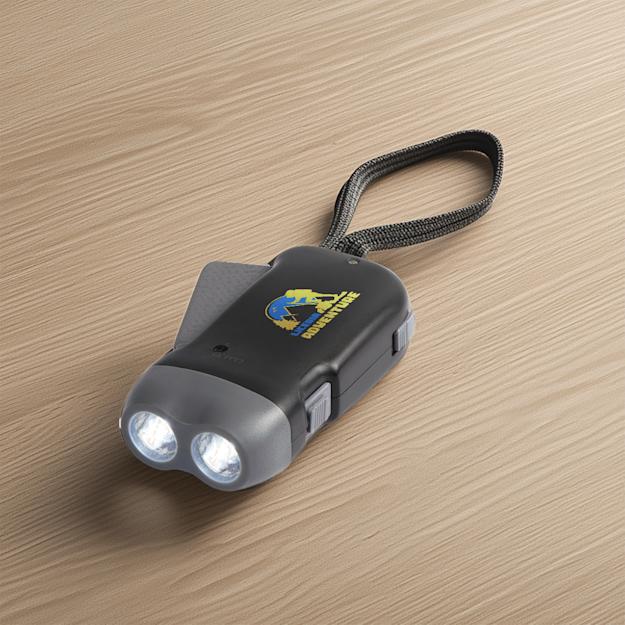
Dynamo LED Torch



- Description
-
Light up your adventures with this handy tool! This innovative torch doesn't rely on traditional batteries—thanks to its dynamo power,... Show all quantities
Light up your adventures with this handy tool! This innovative torch doesn't rely on traditional batteries—thanks to its dynamo power, you're always ready for light when you need it. Perfect for camping trips or late-night walks.
This product is Eco - learn more
What makes this product Eco?Read more on what this Eco product is made from.
Dynamo LED Torch
-
![100% recyclable material]()
100% recyclable material - Learn More
-
![Mix of bio-sourced and virgin materials]()
Mix of bio-sourced and virgin materials - Learn More
Have a question? Feel free to reach out to contact us .
Our team of experts is ready to answer all your questions.
-
- Product specifications
-
Material ABS Plastic Size 10 x 5 x 2.5 cm Weight 79 gr Print technique Pad Printing Design Same design on both sides - Design guidelines
-
- We recommend using our templates and guides for preparing your print-ready PDF.
-
You can download our guides and templates in the template section. Remember to delete the template layers before exporting your design to PDF.
If you already have a design, no worries; we accept other file formats, including JPEG, PNG, or EPS.
For photographic content, high-resolution JPEGs are recommended, preferably without compression. For graphics or text-based content, we recommend print-ready, vector-based PDFs. For content that is a combination of graphics and photography, we suggest using print-ready PDFs to ensure the best quality.
- Submit your file in Vector.
-
For your Dynamo LED Torch, we need a vector file to ensure the print quality. Not sure if you have a vector file, or do you want to know how to create it? Please read our Pixels vs. Vector article.
- Use the PMS colour code(s).
-
When you choose to print a product with solid colours, the design must be supplied with Pantone Solid colours. You can find out here more about the different colour modes.
- Text and fonts specifications PMS (Min. font size is 7 pt)
-
For this product, the minimum font size is 7 pt. To avoid any issues, we recommend the following:
- Fonts must be embedded or outlined.
- If your design contains small black text, make sure it is 100 % black (Cyan: 0 Magenta: 0 Yellow: 0 Black: 100).
Note that we don't check spelling or typographical errors.
- Lines should be at least 0.5 pt.
-
Lines should be at least 0.5 pt.
- Resolution of at least 300 dpi.
-
Make sure the resolution of the images and graphics in your artwork are at least 300 dpi.
- Check your artwork for overprint.
-
Make sure no elements in your artwork are set on overprint unless you want this effect in your design. You can read more about overprint in our Help Centre.
Guide PDF 40 x 30 mm PDF Indesign - Ordering process
-
- Ordering with own design
-
Choose and configure: Choose the product, select your preferences and your desired delivery time.
Add to cart: Add to cart, review your preferences and edit/duplicate if needed. We recommend opting for Premium Artwork Check.
Checkout: Choose the delivery and invoice address.
Payment & design: Choose your preferred payment method in this step. You can also choose to upload your artwork first and pay at a later stage.
Design check: Upload your design. We'll send a digital proof for your approval before the order gets sent to production.
Sit back and relax! - Using editor design
-
Choose and configure: Find the best product for you, configure it and choose your delivery time.*
Design in the editor: Now you can upload and edit your artwork, if necessary, with the help of our editors. From here, you can add your product(s) to the cart.
Checkout: Choose the delivery and invoice address.
Payment: Choose your preferred payment method in this step.
Design check: We'll send a digital proof for your approval before the order gets sent to production.
Sit back and relax!



Do you need help?
Login to your HelloPrint Account
Access to 10.000+ design templates
Automatically save your designs
Easily access your designs later
New to HelloPrint? Sign up or continue as guest
Create a free account or login
Save your design, never lose your design progress
Signing up only takes a minute
Easily access added designs later
Already having an account for Helloprint? Login
By signing up, you agree to our terms of service en privacy policy
Please fill in our form
By signing up, you agree to our terms of service and privacy policy
Only available through bespoke printing
Unfortunately, it's not possible to order this product through our website at the moment
However, our bespoke print management team would be happy to help you with your request. Contact our
team.
Sign up for our newsletter and get a 10% discount on your first order!
This email is invalid.


Show VAT